
Treat Immersive Vehicles as a modular system: the base mod provides the physics and vehicle system, while a matching content pack brings the actual vehicles. Download every file for the same Minecraft and loader combination, and test the full set together.
The official project page lists the mod for both client and server. For multiplayer, the server and players therefore need to understand the same relevant gameplay content.
What You Need
Minecraft Java
Immersive Vehicles is a Java mod and requires a supported Forge or NeoForge version.
Base Mod
Install Immersive Vehicles itself. Without the base mod, vehicle packs can't provide their content.
At Least One Content Pack
According to the project page, the base mod doesn't contain any vehicles. Choose a pack that explicitly matches your Minecraft and IV version.
Complete Dependencies
An expansion pack may additionally require a parts pack or main pack. Check the “Required content” information for each specific file.
Setup Step by Step
Define Your Goal
First decide which vehicles you actually want. This determines which content pack and which additional parts packs are needed.
Write Down the Compatible File Chain
Note the Minecraft version, Forge or NeoForge, IV version, content pack version, and all listed dependencies. “Latest version” isn't sufficient documentation.
Set Up an Empty Test Instance
Start with the loader, base mod, and exactly one content pack. This way an error message stays traceable and isn't hidden by dozens of other mods.
Check the Vehicle in the Client
Check whether IV and the pack are loaded and whether the expected vehicles or parts appear. A warning about missing packs is a sign of an incomplete combination.
Match the Server Separately
Install the matching gameplay set on the dedicated server. Don't adopt unchecked client-only mods, and use the same relevant version states as the players.
Test the Shared Workflow
Check joining, vehicle placement, boarding, movement, refueling or assembly, and the saved state after a controlled restart.
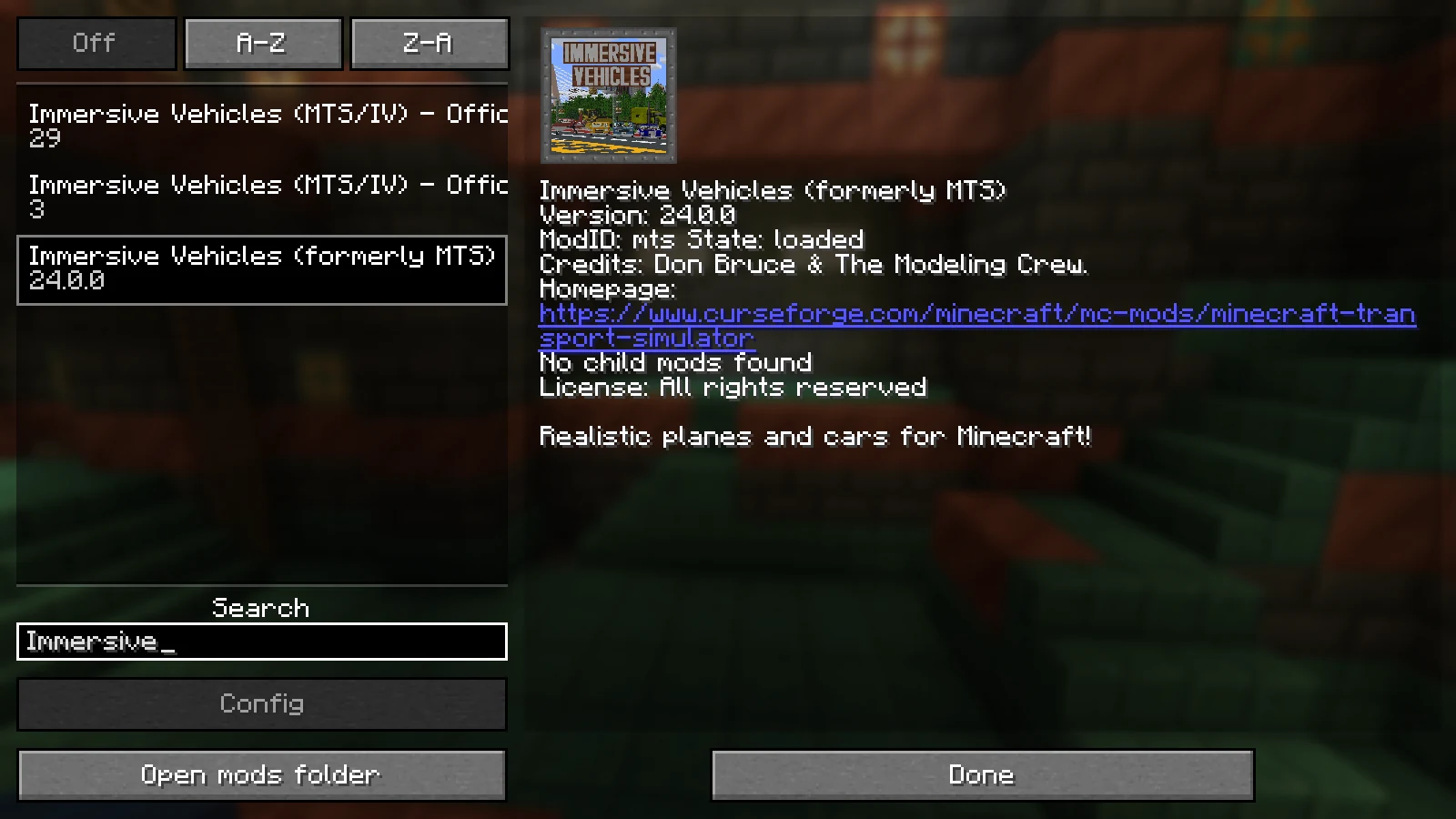
Our Vehicle Example: IV 24, OCP 29 and OAmP 3
The setup from 10 September 2026 uses Minecraft Java 1.21.1, NeoForge 21.1.248 and Java 21.0.7. Its mods folder contained Immersive Vehicles-1.21.1-24.0.0.jar, MTS Official Pack-1.21.1-V29.jar and OAmP-1.21.1-V3.jar. The exact official release pages are listed in the sources below; this combination is a historical example, not a claim to be the latest version set.
Client startup, entering the world and vehicle rendering were observed in a separate Windows world with an integrated server. A scripted trial moved a Luxorama with four wheels and a running engine by about 123.2 blocks. This demonstrates vehicle physics in that trial, not normal player driving.
Controls, fuel consumption, keys, operator permissions, joining a dedicated server and persistence after a restart remain unverified for this setup. Check them in a copy of your world before starting the vehicle project with friends. The visible mod list alone does not demonstrate those functions.
Why the Base Mod Alone Doesn't Show Any Vehicles
Immersive Vehicles separates the vehicle system from the actual content. This makes different vehicle worlds possible, but it also means: a successful installation of the base mod is not yet a complete game installation.
The official content pack adds cars, planes, helicopters, and trucks, among other things. Other packs may require additional parts packs. Check this chain for every single download file, because a similar name or the same Minecraft major version doesn't guarantee compatibility.
Narrow Down Typical Problems Systematically
First test only the smallest complete combination. Add further vehicle packs one after another and restart in between. This way you know the last change if the client or server no longer starts.
| Observation | Next Check |
|---|---|
| IV loads, but there are no vehicles | Is at least one compatible content pack installed, and are further parts packs missing according to the project page? |
| The client starts, but joining the server fails | Compare Minecraft, loader, IV, content packs, and gameplay dependencies on both sides. |
| The vehicle is visible but not ready to drive | Read the specific pack's instructions on parts, engine, fuel, and operation. |
| After adding another pack, nothing starts anymore | Isolate the most recently added file and its dependencies in the separate test instance. |
Changing Configurations Safely
Let the version you're using generate its configuration files itself. Stop the instance, back up the files, and only change existing values while keeping the format. You shouldn't blindly add file names and keys from older versions.
Test a rule with a clear question – for example, the same action once as a normal player and once as an operator. A saved value doesn't yet prove that the running world has applied it. After a change, the server start, log check, and a practical test belong together.
Preparing Updates Without Surprises
Don't just update IV and leave the vehicle packs unchanged. Check the entire file chain and test it with a copy of the world. Vehicles, parts, and inventories are content data; a missing pack can therefore cause more than an invisible menu option.
Keep the backup and the old file list together. If the new set doesn't work, restore the world and mod files to the same earlier point in time.
Reconstructing Dependencies From an Error Message
If Minecraft aborts during startup, read the message from the first stated cause. “Missing dependency” does not automatically mean the IV base mod is absent: a vehicle pack often requires a specific parts pack or a minimum version of another content pack. Note the technical mod identifier, required version range, and file that actually loaded. Check those three details on the download page for that exact release, not just on the general project overview.
If the client starts successfully but the vehicle selection is empty, separately verify that the base mod and content pack appear in the mod list. Then check recipes, creative search, and the pack documentation. Some vehicles consist of several parts and do not appear as one immediately driveable object. Only after the client content is complete is it useful to compare it with the dedicated server.
If only multiplayer joining fails, compare files by complete name or checksum. Similar display names can hide different loaders or builds. Do not remove files from the production world to narrow the issue down. Build an empty instance with the loader, IV, and one content pack, confirm joining there, and then add every further dependency one at a time.
Checking Vehicles and World State Before an Update
Before changing versions, create a small inventory: which vehicle types exist in the world, which parts are installed, which cargo is stored in vehicles, and which packs supply those contents? Park important vehicles in loaded chunks and, if useful, take screenshots of their equipment. This list helps you distinguish after the update whether an object is truly missing or is merely listed under a changed name or recipe.
Apply the update first to a copy of the world, configuration, and complete mod directory. Check the startup log, a normal join, existing and newly built vehicles, refueling, movement, and persistence after a restart. If a required pack is incompatible, delay the full update or stay on the documented old set. A partially modernized file chain is usually riskier for content mods than a deliberately frozen and jointly tested version.
Keeping a Shared Pack Version Reproducible
Create a manifest from the working test combination with the complete file name, project link, and version number for the loader, Immersive Vehicles, and every content or parts pack. Also mark which files belong on the client and server. This prevents someone from placing a similarly named Forge pack in a NeoForge instance or updating only the base mod. Checksums help when launchers rename files or players claim to be using the same version.
Roll out changes in two stages: first a test client and test server, then the production world. An empty world is enough in the first stage to check the loader, dependencies, and joining. The second stage needs a world copy containing your real vehicles, parts, and configurations. This separates a fundamental startup problem from an issue that only appears with existing content data. Both stages must include a controlled restart.
Only distribute the approved version after documenting the result. Record at least who tested, which client joined, which vehicle was placed and moved, and whether state and inventory survived the restart. When a later error occurs, begin the analysis at the first difference from this manifest. This is faster and safer than randomly removing individual mods or adopting configuration files from unrelated versions.
Include permissions and game mode in the test. An operator in creative mode may have access to parts or actions unavailable to a normal Survival player. Therefore test crafting, placement, assembly, fuel, and inventory at least once without administrator rights. If only operators succeed, compare the pack documentation and server rules instead of reinstalling the mod files. Community servers should also decide who may dismantle, refuel, or access inventories in other players’ vehicles.
Frequently Asked Questions
Why don't I see any cars even though the mod is installed?
According to the official project page, Immersive Vehicles doesn't contain any vehicles. You need a compatible content pack and, if applicable, its further required packs.
Does every player need the same vehicle packs?
For Java multiplayer, plan for the same relevant gameplay and content version on the server and clients. Differences typically lead to missing content or a failed join.
Is there a single control scheme for all vehicles?
Not reliably. Content packs can have different parts and operating procedures. Use the in-game handbook and the documentation for the specific vehicle.
Can I just copy my own models into the mods folder?
A 3D file is not yet a finished vehicle pack. For normal operation, you need a content pack built for IV and matching your version.
Editorial review method
The MCRedstone editorial team checks version and compatibility details against the official project sources linked below. Dated observations from isolated Minecraft test instances are listed in each article. Other control steps are instructions for your own checks; multiplayer, persistence, and troubleshooting claims are limited to what those tests and primary sources support. We review the article again when relevant details change and update the review date.
Official Sources
Versions, dependencies, and supported loaders can change. Before every download, check the details for the specific file on the official project page.
- Immersive Vehicles 24.0.0
Exact release from the documented setup of 10 September 2026; not a new functionality test.
- Official Content Pack V29
Exact release from the documented setup of 10 September 2026; not a new functionality test.
- Official Automobile Pack V3
Exact release from the documented setup of 10 September 2026; not a new functionality test.
- Immersive Vehicles on Modrinth
Official project page with platforms, supported environments, and an explanation of the content pack system.
- Official Content Pack on Modrinth
Official content pack with vehicles and the dependencies of the respective downloads.
- IV Official Automobile Pack
Example of an expansion pack that requires additional mandatory content.