
According to the Floodgate documentation, once your accounts are linked you use the Java player data, even when you join from Bedrock. Your previous Bedrock player data is not accessible while the accounts are linked. Linking does not merge the two inventories automatically. If this identity switch is the actual cause, the official instructions say to unlink, transfer your items, and link again. Before you do, check the server, the accounts, the type of linking and your backups. If your player data has actually been deleted or overwritten, unlinking alone won't restore it. Source: Floodgate Linking
Java and Bedrock · Help for players and server owners · Sources checked November 1, 2026
You link your Bedrock account to your Java account, rejoin your Minecraft server, and suddenly you're looking at a different inventory. Your armor, experience or the contents of your Ender Chest may be missing too. It looks like a reset. With Floodgate, though, there can be a different reason: after linking, the server loads the player data of your Java account.
This guide helps whether you play on MCRedstone, with another provider or on a self-hosted server. You don't need a hosting account to use the explanation. The admin steps are kept clearly separate from what you can check yourself as a regular player.
First, Don't Reset Anything
If items are missing right after linking, stay somewhere safe and avoid any further major changes. Don't delete the world or any player files. Don't reinstall Geyser or Floodgate on a hunch. Don't switch the server's authentication mode just to make an old name show up again.
Instead, write down the time, the edition you used, the server and game mode, and the two linked accounts. If you can, take private screenshots of your inventory and your Ender Chest for comparison. Don't share login details, linking codes or private account information publicly. Any screenshot or recording you publish must have private player names hidden.
Your first win is an explanation of what you're seeing, not a fix yet. Does the supposedly empty inventory match the known Java account? Are you really on the same survival server and not in a lobby? Did the admins restore a backup at the same time? These answers decide which path makes sense.
If you're just a player, you can collect these observations. Changes to server files, plugin databases and backups are handled by the server's admins. You don't need to switch hosts to solve this problem.
What Geyser, Floodgate and Linking Each Do
Geyser lets Bedrock clients connect to a Java server. Floodgate adds sign-in for Bedrock players so they don't each need a Java account. Account linking is an extra feature: it maps a Bedrock account to a Java account. That makes crossplay and linking two different things. A server can let Bedrock players in through Floodgate without every player linking their accounts.
What matters for your inventory is which player identity the server has you under. A display name alone is not reliable evidence of that. Servers and plugins use UUIDs, among other things, which are unique player identifiers. An unlinked Floodgate account has a different identity from the Java account you later link it to.
Picture two separate records: one for your previous Bedrock access and one for your Java access. Both can hold their own progress on the same server. After linking, a supported configuration uses the Java record. The Bedrock record is not automatically copied into the Java record.
That also explains a particularly confusing case: your Java account had never been active on this server, or only briefly. Its player data is correspondingly new or almost empty. As soon as Bedrock is linked to that account, exactly this barely advanced state can appear, even though you had played on Bedrock for a long time before.
This explanation is about the player data on the Java server in question. Global Linking does not turn a local Bedrock singleplayer world into a Java world, and it does not move your items to another server. It doesn't replace either edition, and it doesn't make Java modpacks that require client mods compatible with Bedrock. Basics and limits: Geyser FAQ
What Can Change After Linking
The official linking documentation specifically mentions the Java account's location, inventory data and progress. It explicitly advises transferring items, armor and Ender Chest contents to the Java account before linking. For your server, that gives you the following checklist:
| Area | What to check |
|---|---|
| Inventory and hotbar | Do you see the Java account's items instead of your previous Bedrock gear? |
| Armor and offhand | Did you really account for these slots when you prepared? |
| Ender Chest | Compare the personal contents of both identities; the placed chest is not the contents themselves. |
| Position and dimension | Does your location match the Java account's last visit or a first join? |
| Experience and progress | Check the current state separately; handing over items does not transfer experience levels. |
| Homes, money, claims, ranks | Plugins may manage this data, and it needs its own check. |
A regular chest in the world is not the same as your Ender Chest. A regular chest holds items at one spot in the world. An Ender Chest, on the other hand, shows the personal contents of the player data currently in use. Placing a second Ender Chest therefore won't bring back the other identity's contents.
There is no universal promise for plugin data. An economy plugin may store balances by UUID, while another system may use additional mappings. Homes, land permissions or groups can therefore behave differently from your regular inventory. A correctly displayed Java inventory doesn't mean every plugin is already working the way you expect.
The practical difference matters: if only your homes are missing while your items are correct, a general inventory reset is the wrong move. If you've lost access to a claim, the admins need to check who it's assigned to. Handling one data area at a time is safer than replacing your entire player data.
Before and After: Our Tests
In our own test on October 29, 2026, the Bedrock account really did switch to the Java player data after linking. After unlinking locally and rejoining, the original Bedrock items appeared again. For this, we used two existing Microsoft-authenticated accounts on a newly created, isolated test server. The names stay anonymized here.
The following values come from the received inventory packets, the player IDs logged on the server, and saved player files. This was a test with protocol clients, without a rendered game interface. The illustration is not gameplay footage. Images from the real game are shown in the follow-up test from October 30 further down.
| State | Joined via | Confirmed inventory | Confirmed Ender Chest |
|---|---|---|---|
| A: before linking | Bedrock, unlinked | 12 diamonds, iron pickaxe | 16 emeralds |
| B: before linking | Java | 8 bread | empty |
| C: after local linking and rejoining | Bedrock | 8 bread; Java player ID loaded | empty in the loaded Java data |
| D: after local unlinking and rejoining | Bedrock | back to 12 diamonds, iron pickaxe | back to 16 emeralds |
| E: after a controlled handover and linking again | Bedrock | 8 bread, 12 diamonds, iron pickaxe | 16 emeralds |
The original Bedrock data also had an iron chestplate equipped and three torches in the offhand. This gear came back in state D as well. In state C, it was not present in the loaded Java data. Meanwhile, the old Bedrock file still held its separate items.
So linking did not turn twelve diamonds into eight pieces of bread. The server loaded a different identity. Nor were the emeralds automatically moved into the Java Ender Chest. Comparing player ID, inventory and Ender Chest explains the apparent loss far better than a reinstall would.
Setup and limits of the protocol test: We tested Paper 1.21.11, build 132, Floodgate 2.2.5, build 141, Geyser 2.12.1, build 1276, and a Bedrock protocol client for 1.26.45 over RakNet. ViaVersion and ViaBackwards were installed; additional inventory plugins were not. The link was stored in a local SQLite database, and Global Linking was turned off on this test server. This observation confirms the described identity switch in this setup. It is not a test of all server plugins, platforms or the GlobalLinkServer, and it makes no claim about the latest version of any of them.
For state E, the worthless test items in the protocol test were moved administratively into the Java target data through an intermediate chest and regular server commands, and removed from the Bedrock items. After that, the relinked Bedrock account confirmed the prepared target data, including the Ender Chest and gear. The handover through the normal game interface is shown in the follow-up test below.
In both tests, Floodgate reported success when unlinking locally, without automatically disconnecting the connected client. Only rejoining showed the Bedrock identity again. So for a short time, a success message and the character that is still loaded can belong to different steps of the process.
If you collect more items while linked, the server assigns them to the Java data in use. Unlinking doesn't rewind your playtime: it switches the mapping back instead of carrying later Java progress over into the old Bedrock data.
Apply the observation to your situation: Compare two clearly distinguishable features, for example your hotbar and your Ender Chest. Such features are clues; for the admins, the identity recorded on the server remains the better proof. Don't change any files just to recreate the test inventory used here.
Follow-Up Test in the Real Game: Inventory and Ender Chest
On October 30, 2026, we repeated states A, C and D with the regular Minecraft Bedrock client for Windows, version 26.60. The test server was again newly created and isolated: Paper 1.21.11, Geyser 2.12.1, build 1277, with connections over NetherNet, Floodgate with local SQLite linking, Global Linking off. We again prepared the test items with server commands. We linked with /linkaccount on both sides and unlinked with /unlinkaccount from the Bedrock account.
The Java account kept running as a protocol client. That's why there are no images from the Java game; state B comes from the protocol test only. The images are crops of the Bedrock interface, and no names are visible. The game client ran in German, so the interface labels in these crops are German.
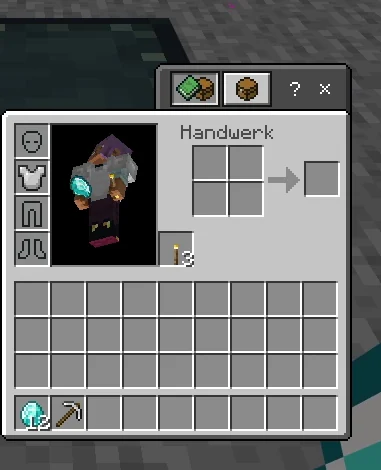
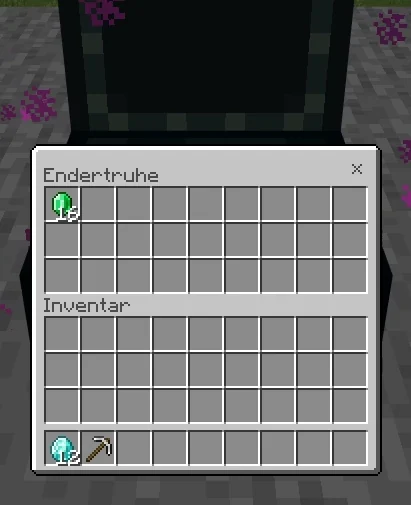
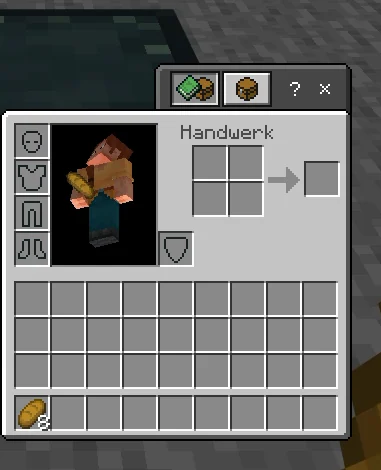
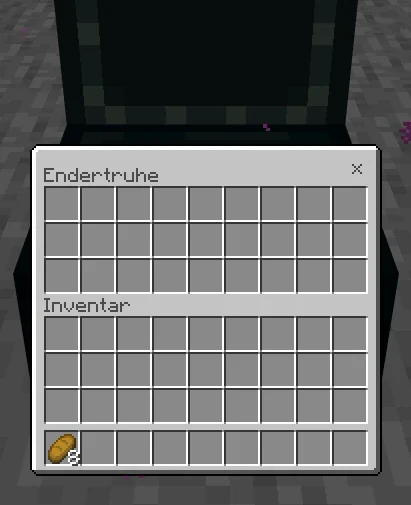
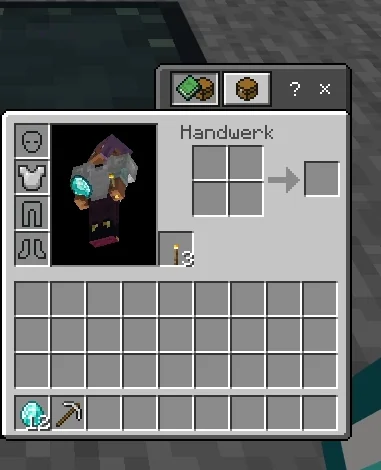
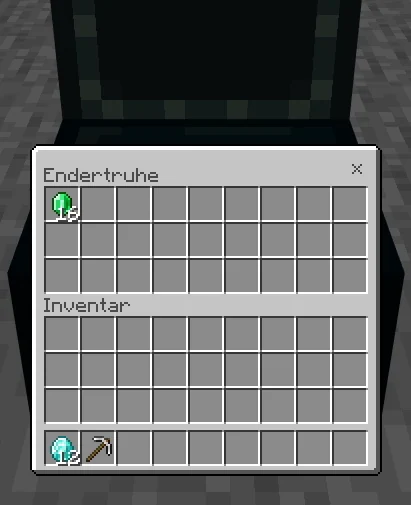
/unlinkaccount and rejoining. The Bedrock data is back unchanged, with its gear and Ender Chest.Handing Items Over Through a Regular Chest
In the same follow-up test, we tried the handover through the game interface, without server commands for the items. The still unlinked Bedrock account took the 16 emeralds out of its Ender Chest. Then it put them in an ordinary chest together with the 12 diamonds and the pickaxe. After that, we linked again. After rejoining, the same client loaded the Java data, took everything out of the chest and put the emeralds into that data's Ender Chest.
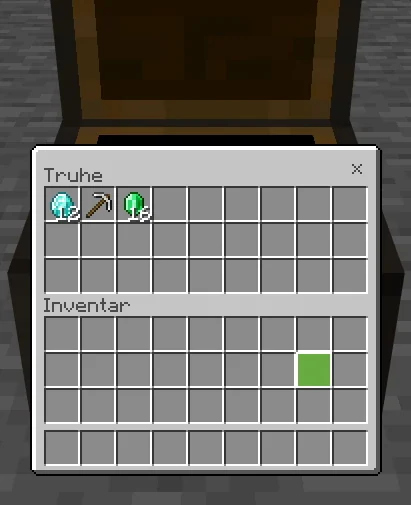
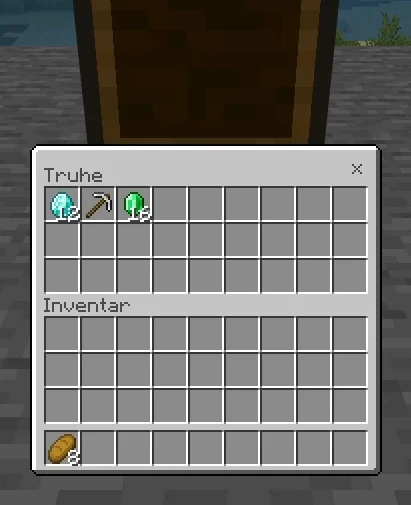
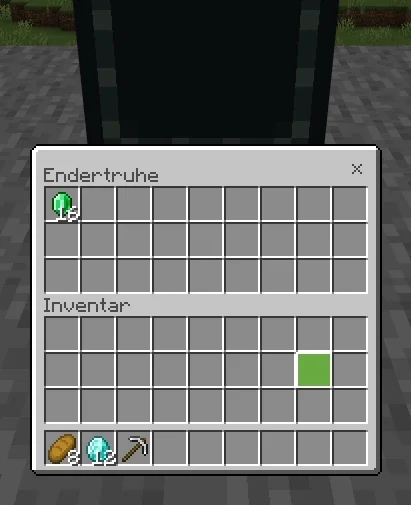
Limits of this handover: We used an ordinary chest on an isolated test server without protection or inventory plugins, with only two test accounts. We did not recreate the chest protected from other players described under Preparation. Whether a protection plugin on your server allows the handover depends on its rules. We did not hand over the chestplate and torches. We only checked the arrival after linking again; until then, the items stayed in the chest. On a server with other players, it's safer to check the arrival with the Java account before linking.
Linked Globally or Locally: This Decides the Way Back
Floodgate distinguishes between Global Linking and Local Linking. With Global Linking, the account link is stored centrally and can be used on servers that have this feature enabled. With Local Linking, a server or network manages its own mapping.
According to the official documentation, both can be active at the same time. An entry in the local database takes precedence over a global entry. That's why “I unlinked globally, but everything here stayed the same” can have an understandable reason: a local link is still in effect on this server. Source: Floodgate Linking, Local Linking section
Check the scope before you change anything. Did you create the link through the official Global Linking route or through a command on your game server? Do the admins know whether a separate linking database is in use? Does the same Bedrock account behave differently on different servers? That observation can point to different settings; on its own, it doesn't prove there's an error.
Global means a shared account mapping, not a shared inventory across all servers. Your survival server and someone else's minigame network keep their own worlds and data. A global change can affect which identity is used there, but it doesn't move any gear between them.
If you've played on several servers for a long time, go through the preparation for each affected server. An Ender Chest secured on server A doesn't protect your data on server B. Let the admins of each server know if local special rules, claims or economy data are affected.
Preparation: How to Protect Both Sets of Player Data
Choose Your Target Data First
Decide which account should be your permanent identity from now on. With the Floodgate linking described here, the Java data is what counts. If your most important progress so far is on Bedrock, you need an orderly way to transfer it first. “Merge everything” is not a single Floodgate switch.
Make sure both accounts really belong to you and that you can access the logins you need. A similarly spelled name is not enough. Don't link someone else's account as a shortcut: the mapping determines which identity you'll play under later.
Take Stock
For each account separately, write down inventory, armor, offhand, Ender Chest, location and important plugin data. If you only know your Bedrock data, take a look at the Java data beforehand. That way you'll be able to tell afterwards whether the right state was loaded.
Inventories with many items are easier to check with several private screenshots. For valuable or specially named items, a blanket note like “my gear” isn't enough. Record which items should actually have arrived later.
Get a Suitable Backup Confirmed
On your own server, back up the affected worlds and player data before making changes, along with the databases of any plugins involved, if applicable. On someone else's server, ask the admins about their existing backup and restore process. A screenshot documents ownership, but it doesn't replace a data backup.
The backup should have a traceable timestamp and be stored outside the working files that may be overwritten. Also check how a single player's data could be restored. Rolling back an entire world can cost every other player the progress they've made since the backup.
Transfer Items in a Controlled Way
As long as the accounts access the server separately, you can hand over items normally on a suitable server: for example, through a regular chest that both can reach and that's protected from other players. First move the contents you want out of the Bedrock Ender Chest into your inventory, then hand them over to the Java account in the agreed way. Our follow-up test with a regular chest shows what this looks like in the real game.
Remember armor, offhand and full inventory slots. Don't use an unprotected chest at spawn, and don't drop valuable items on the ground. Container permissions or server rules can prevent a handover; in that case, the admins arrange a permitted way. If only one device is available, secure temporary storage with one login after the other can make sense.
Check the arrival with the Java account before you link. The item transfer is only successful once that account actually owns the items. Experience, advancements, homes, ranks and claims have not been transferred by this. Put those on your list as separate points.
Global Linking: The Documented Process
The official starting point is https://link.geysermc.org/. Open this address yourself and follow the methods offered there. The server method below is described in the Floodgate source documentation retrieved on October 29, 2026; we did not carry it out with accounts for this guide.
- Connect both accounts to the GlobalLinkServer at
link.geysermc.org. The documented ports are25565for Java and19132for Bedrock. - Start on one of the two accounts with
/linkaccount. - The server shows a random code. Enter it only on the other account you're linking.
- On that second account, use
/linkaccount <code>. Replace<code>with the code actually shown; the angle brackets are not part of it. - The documentation then describes both connections being closed with a success message. Read the actual wording. An arbitrary error message or a dropped connection on its own is not proof of success.
After that, reconnect to your actual game server and check for the expected Java data. These steps are not meant as a command sequence for just any Minecraft server. Local linking can show different instructions. On such a server, use that server's help and follow its procedure.
For global links, the documentation names the GlobalLinkServer as the way back: connect one of the accounts and use /unlinkaccount there. Afterwards, too, check the actual status and log in to the game server again. On a local server, the same command name doesn't automatically have a global effect.
If your device doesn't let you enter a custom server address, that's a separate access problem. So don't change server details or account mappings on a hunch. Use the current official connection instructions for your device, or check with the admins about an existing permitted way to join.
Already Linked and Your Inventory Seems Gone: The Safe Diagnostic Path
Check the Environment
First, compare the server address, port, game mode and world with your previous access. On networks, moving to a different lobby, world group or survival instance can show a different inventory. If you already had several inventories before linking, make sure you compare the same area.
Also ask about changes during the same period: a new world, a restored backup, an inventory plugin, proxy changes or a changed login setup. A timing connection with linking is a strong clue, but not proof that it's the only cause.
Compare Against the Java Data
If the state matches the Java account, that fits the documented behavior. Note what matches: inventory, Ender Chest, position. If only one thing differs, check the feature responsible for it first instead of replacing all the data.
If even the Java data is unexpectedly empty, the admins need to investigate further. Maybe the wrong Java account is linked, maybe the connection lands on a different backend. Unlinking is then a possible diagnostic step after a backup, but not a guaranteed fix.
Back Up the Current State Before Going Back
If you've already played since linking, record that progress too. Otherwise, a later blanket restore could cost you new items or builds. The admins need the time of linking and the period since then to keep the data cleanly apart.
Unlink in the Right Place
Use the matching global or local method. If you're unsure about the local database, ask the admins first. After unlinking successfully, log in again and compare your old Bedrock data.
If it's visible again, transfer the items you want to the Java account in a controlled way, check that they arrived, and only then link again. This is exactly the basic way back that the Floodgate documentation describes. It assumes that the old data still exists and that no additional configuration overrides the mapping.
If Your Old Data Doesn't Appear
Stop experimenting. Linking and unlinking again and again without learning anything new makes the history harder to trace. Give the admins your timestamps and the states you observed. They check the actual identities, local links, stored data and backups.
If old data can only be recovered from a backup, you need a concrete restore plan. It has to explain which data will be replaced, which newer progress is affected, and how the state before the intervention will be backed up. A complete server reset is not automatically necessary for this.
For Admins: Check the Identity Before Changing Files
The technical task comes first: Which identity actually arrives at the responsible game server, and which data source does it load? Note the observed username and UUID for each account. Use existing server logs or the management tools intended for this. The Floodgate FAQ explicitly points to server logs for finding UUIDs.
The unlinked Floodgate UUID can be derived from the Xbox user ID (XUID). That explains why the IDs differ, but it's no reason to rename player files based on a guessed file name. Compare values you have actually observed. Don't publish complete private logs or key files in the process. Source: Floodgate FAQ
In a proxy network, it's not enough to look only at the name at the entry point. Check which identity arrives at the backend and whether player information is forwarded correctly. Installation, platform and forwarding have to match your actual setup. The official setup guide distinguishes between single-server and proxy installations. Source: Floodgate Setup
Caution: Conflicting Configuration Examples
Take the key names from the configuration file of the Floodgate version you actually have installed. The default configuration checked here and our own test setup use enable-global-linking. Older or differing versions of the sources may show other examples, so don't copy any YAML section without checking it.
The retrieved default configuration contains, among other things, enabled, require-link, enable-own-linking and enable-global-linking under player-link. These names are a guide for checking, not a prompt to toggle all of them. require-link concerns the requirement for joining; it is not an inventory transfer. According to the comment in the configuration, the local database takes precedence over Global Linking. Source: Floodgate default configuration
Document the version or build and the relevant existing settings without copying database passwords or keys into the report. A change to the linking system can affect several players. Where possible, solve an individual problem through the specific mapping instead of switching the system off server-wide on a hunch.
No Blanket File Renaming
Instructions along the lines of “rename the Bedrock file to the Java UUID” leave out major risks: the Java data may already contain valuable information, plugins may have their own storage locations, and a running server can overwrite changes again. A complete set of player data also contains more than just items.
If a targeted data migration becomes necessary, work on a copy with a suitable tool, document source and target, and define which fields should be carried over. Back up both original states. Don't let the affected accounts keep playing uncoordinated during such an intervention. Afterwards, check login, inventory, Ender Chest and all explicitly migrated plugin data.
This guide deliberately doesn't give a universal NBT copy command: without knowing the server platform, version, inventory management and existing data, it would not be a reliable repair guide. For many simple cases, a regular item handover is easier to understand and easier to check.
How to Interpret Common Symptoms
| Observation | Possible explanation | Sensible next step |
|---|---|---|
| After linking, Bedrock shows exactly the Java inventory | Expected identity switch | After a backup, transfer the missing Bedrock items using the appropriate way back. |
| Inventory is right, Ender Chest looks empty | The Java Ender Chest was empty; the old personal contents belong to the Bedrock identity | Compare both contents specifically; don't just open a different Ender Chest. |
| Unlinked globally, unchanged on one server | A local entry takes precedence, or the status isn't taking effect as expected yet | Log in again; have the local mapping and the actual backend identity checked. |
| Items are right, homes or money are missing | Plugin data is mapped differently | Have the responsible plugin and its transfer method checked. |
| Other players are losing progress too | Possibly a world change or a restored backup | Check the shared time frame and server changes, not just linking. |
| After unlinking, things still aren't as expected | Wrong environment, another mapping or changed data | Stop further attempts and give the admins your documented findings. |
The table lists hypotheses, not remote diagnoses. Two similar symptoms can have different causes. The most useful evidence pattern is a comparison of the same environment, known accounts and actually loaded identities before and after a single, traceable change.
Checklist: When Is the Problem Really Solved?
- You know which Java account is linked to which Bedrock account.
- You know which type of linking applies and whether a local entry may take precedence.
- You're on the right server, in the right world or inventory group.
- Inventory, armor, offhand and Ender Chest match the agreed target data.
- New items since the first link were taken into account in any restore.
- Experience, homes, balances, claims and permissions were checked separately, as far as they matter on your server.
- The backups you need still exist, and you know the way back.
- Logging in again through the intended route still shows the expected data.
“There are no more error messages” tells you less than this check. Conversely, an empty Ender Chest is not an error if that is exactly the documented state of the chosen Java account and you didn't want to carry over any items.
Message to the Server Admins
A factual report saves follow-up questions. You can adapt this template privately:
Since linking my Bedrock account to my Java account on [date and time], I've been seeing different player data on [server and game mode]. I linked via [the global method or a local server]. Before, I had [short description]; now I see [short description]. My inventory and Ender Chest show [observation]. Since then, I have [kept playing or not made any major changes]. Please check the active identity and any local link before replacing player files or backups. I'll share my account names with you through a private support channel.
Don't include passwords, session cookies or linking codes. If you've already gone through a global way back, mention the result and the time. That way, two people won't start different repair attempts at the same time.
Short Glossary
UUID: A unique identifier a Java server can use to tell players apart. A display name and a UUID are not the same thing.
XUID: The ID of an Xbox account. Floodgate uses it in connection with the Bedrock player identity.
Player data: The data stored on a server for the identity in use. It can include inventory, location and other values; plugins may manage additional data separately.
Global Linking: A central mapping of a Bedrock account to a Java account for servers that use this feature.
Local Linking: An account mapping managed by the server or network. A local entry can override a global one.
Rollback: Restoring an earlier backup. Progress made after that point can be lost; unlinking alone is not a rollback.
Sources and Validity
Sources checked: November 1, 2026, Europe/Berlin (first check: October 29, 2026). The explanation is based on the official GeyserMC/Floodgate documentation. During the first check, direct access to the wiki was partly blocked; we retrieved the source files from the official, now archived GeyserWiki repository in full and saved them locally with checksums. The current wiki source is maintained in the GeyserWebsite repository, which the links below point to. The only setups we tested in practice are the test setups from October 29 and 30, 2026, described above. Configuration and server rules can differ from the documented defaults.
- Floodgate: Linking · official source file
- Floodgate: FAQ · official source file
- Floodgate: current default configuration
- Official Global Linking
- Floodgate: Setup
- Geyser: Frequently asked questions
Minecraft and the projects mentioned belong to their respective owners. MCRedstone is not an official Minecraft product and is not associated with Mojang or Microsoft.
Frequently Asked Questions
Does Floodgate Delete My Inventory When I Link?
The official linking description explains a switch to the Java player data. Your previous Bedrock data is not accessible while the accounts are linked. This is not an automatic merge. If things behave differently, whether your specific installation also changed or lost data needs to be checked separately.
Why Do I See the Same Items on Bedrock as on Java?
That is exactly what's intended when linking is in effect: both ways of joining use the Java player data on this server. This requires the server to take the link into account. Other servers may be configured differently.
Will My Old Items Come Back After Unlinking?
If the identity switch was the cause and the old Bedrock data is preserved unchanged, it should become accessible again. That's the way back described in the official instructions. Unlinking does not, however, repair deleted files, wrong worlds or overwritten backups.
Can I Merge My Java and Bedrock Inventories Automatically?
Account linking itself does not merge inventories. You can transfer items normally beforehand; other progress may need help from the admins. If an additional tool promises a migration, it has to fit your data and plugins and should be tested on a copy first.
Do I Have to Link My Accounts at All?
Not in general. Floodgate allows Bedrock players to sign in without a Java account. A particular server can still require linked accounts, though. Whether that applies on your server depends on its configuration. Linking is not a blanket requirement for every crossplay server running Geyser.
Does Global Linking Change All My Minecraft Worlds?
No. Global Linking provides an account mapping for servers that use it. Local worlds and independent server inventories are not merged. On several participating servers, however, you may see something other than your previous Bedrock data on each of them: the Java data stored there.
Does It Help to Remove the Dot in Front of My Bedrock Name?
That is not an inventory transfer. Floodgate uses a configurable name prefix to avoid name conflicts; the FAQ warns against removing it carelessly. Check the identity instead of just changing how the name is spelled.
Why Don't /linkaccount or /unlinkaccount Work Here?
You may be on the wrong server for the type of linking you want, local commands may not be enabled, or Local Linking may not be set up. For the global server method, the documentation names the GlobalLinkServer. For local links, your installation's help and permissions apply.
Editorial review method
The MCRedstone editorial team checked the linking process against the official Geyser and Floodgate documentation linked in this article, last on November 1, 2026. Our own observations come from the isolated tests described above: a protocol test on October 29, 2026 and a follow-up in the real game on October 30, 2026. They are not a test of every plugin or of the Global Linking server. We review the article again when Floodgate changes its linking behavior.